An active campaign is abusing ConnectWise ScreenConnect, a remote support tool that many managed service providers (MSPs), system integrators and original equipment manufacturers (OEMs) use to reach their customers' computers. On 11 November 2026, ConnectWise published a Trust Center advisory saying it is aware of unauthorized access to ScreenConnect partner accounts and the deployment of unauthorized remote access software in customer environments. The status is "cause and scope under investigation." Huntress and Sophos have both confirmed malicious ScreenConnect deployments. No CVE (Common Vulnerabilities and Exposures) identifier has been assigned, no named threat actor has been blamed, and no government agency has issued guidance yet.
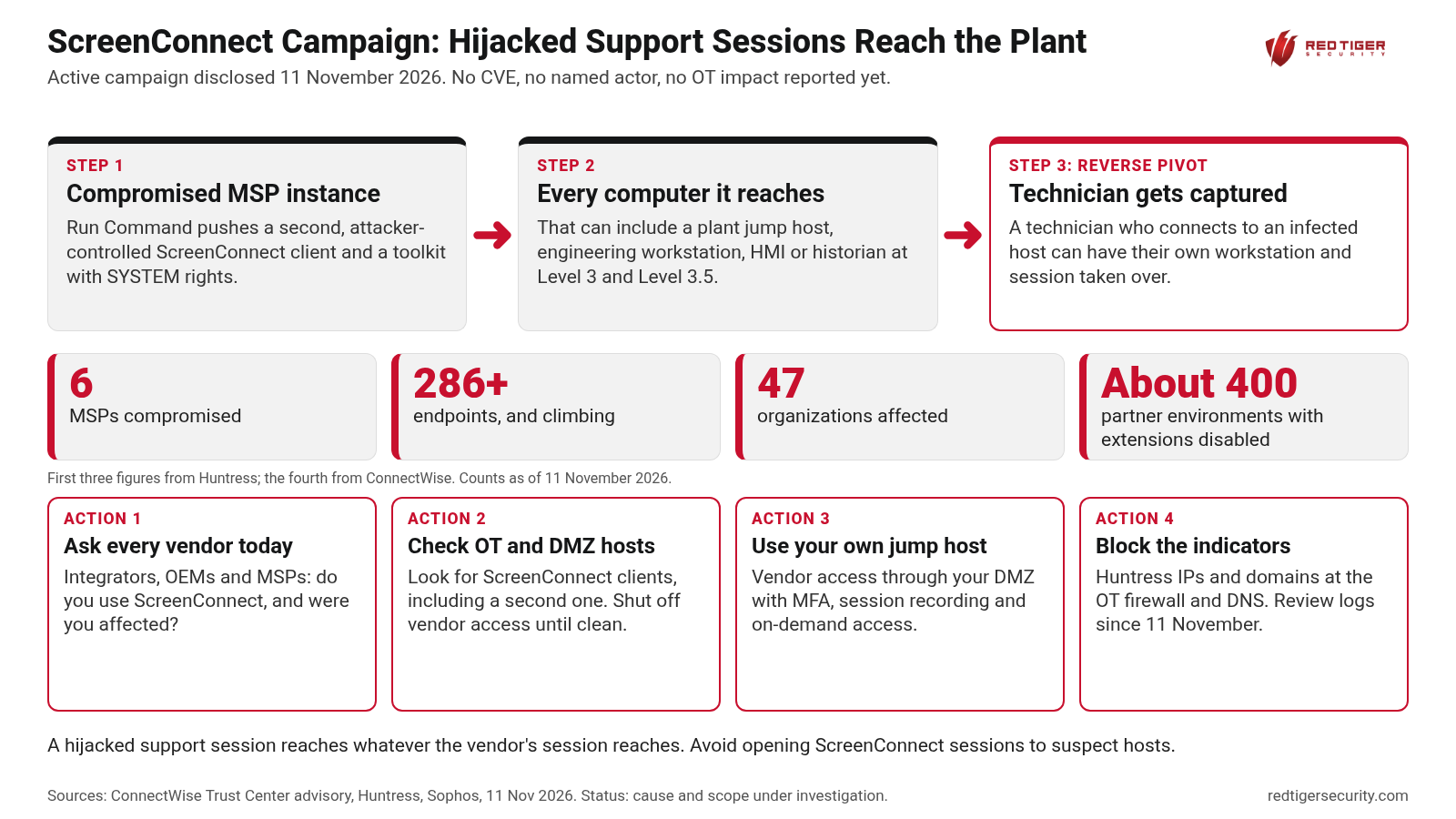
According to Huntress, the activity began at about 17:48 UTC (11:48 AM Central) on 11 November. An unauthorized party used the ScreenConnect "Run Command" feature on MSP instances to push a second, attacker-controlled ScreenConnect client to every computer those instances could reach, along with a PowerShell toolkit that runs as a scheduled task with full SYSTEM rights. Huntress counted six compromised MSPs and more than 286 endpoints across 47 organizations, and said the numbers were still climbing. Huntress also warned that the toolkit is built to spread backward: a technician who connects to an infected computer can have their own workstation and session captured, and then used against every other computer that technician supports. Huntress calls this a reverse pivot.
ConnectWise said it identified five independent third-party extensions that may be associated with the activity: Labtech Plus, RMM Plus, RMM+, RMM Plus Password Link and RMM+ Password Link. About 400 partner environments had one or more of them installed. ConnectWise disabled these extensions in its cloud as a precaution, but partners who run ScreenConnect on their own servers (on-premises) must disable them themselves. ConnectWise stresses that having one of these extensions does not by itself mean a partner was compromised, and that the initial access method and full scope are not yet known.
Integrators, OEMs and MSPs commonly use ScreenConnect and similar tools to support engineering workstations, human-machine interface (HMI) computers, historians and jump hosts at Level 3 and Level 3.5 of the plant network, including the industrial demilitarized zone (DMZ) between business and control networks. A hijacked support session reaches whatever the vendor's session reaches. If a vendor instance is compromised, an attacker can arrive on a plant computer through a path that firewalls were set up to trust. No impact on operational technology (OT) has been reported in this campaign so far, but the path exists at many sites.
ConnectWise advises partners to confirm the five extensions are disabled and preserve related records; to investigate suspected compromise with separate security tools and avoid opening interactive ScreenConnect sessions to suspected computers; to revoke active ScreenConnect and identity provider sessions, reset passwords and enforce multifactor authentication (MFA) from a separate, trusted device; to keep authentication, extension, administrative, Run Command and Toolbox records; and to isolate and clean up affected computers under their incident response plan. ConnectWise also notes that updating ScreenConnect alone does not replace an investigation.
Huntress published network indicators to block at the firewall and in DNS (the Domain Name System). The addresses are written with brackets so they cannot be clicked: 185.99.255[.]28, 155.94.150[.]39, newnewnew.gotdns[.]org, soxnewwork.homedns[.]org, sc.payproofkit[.]com and ns.mo7sen[.]dev.
Red Tiger has completed more than 500 OT security assessments and trained more than 4,500 people, and vendor remote access is a path every plant should review. We do more than find and fix weaknesses like this one. Our team can also install a firewall and sensor at the site, connect it to the Red Tiger 24x7 Security Operations Center (SOC), and monitor the plant for ongoing detection and response as a 24x7 managed service, with metrics and reports, so an unexpected remote access session into the control network is spotted and handled quickly.
We are here to help, so check out our resources online at www.redtigersecurity.com and book a follow-up call with our team if you have any questions: https://calendly.com/jonathanpollet/30min
Sources: ConnectWise Trust Center advisory, 11 November 2026 https://www.connectwise.com/company/trust/advisories ; Huntress, 2026 November ScreenConnect https://support.huntress.io/hc/en-us/articles/57422935234195-2026-November-ScreenConnect ; BleepingComputer https://www.bleepingcomputer.com/news/security/active-screenconnect-attacks-breach-msps-impact-dozens-of-organizations/ ; Sophos https://www.sophos.com/en-us/blog/malicious-screenconnect-deployments-observed
Check out our resources and book a follow-up call with our team.