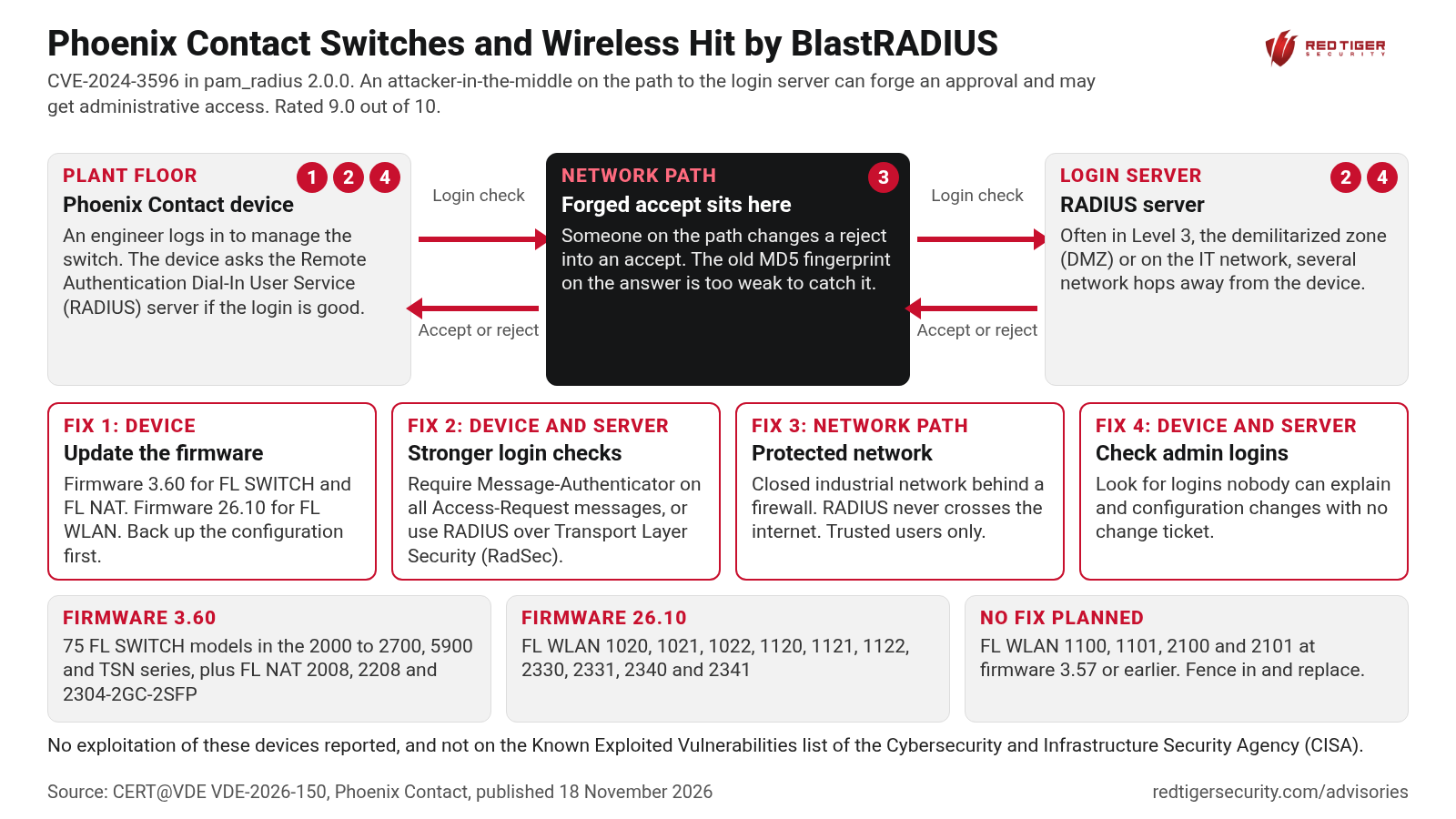
Phoenix Contact has confirmed that a large part of its FL SWITCH, FL NAT and FL WLAN product lines are affected by BlastRADIUS, a known weakness in the Remote Authentication Dial-In User Service (RADIUS) protocol tracked as CVE-2024-3596. CERT@VDE, the German computer emergency response team for industrial companies, published the advisory, VDE-2026-150, on Wednesday, 18 November 2026. Phoenix Contact has released fixed firmware for most models, but four older FL WLAN models will not get a fix.
Many sites set up their network switches so that a person logging in to manage the switch is checked against one central login server instead of a password stored on each device. RADIUS is the common protocol for that check. The switch sends the username and password to the RADIUS server, and the server answers with an accept or a reject. Those answers are protected with MD5, an old method of putting a digital fingerprint on a message so the receiver can tell it was not changed. MD5 is now considered weak, because a well-equipped attacker can create a fake message with a matching fingerprint.
BlastRADIUS takes advantage of that weakness. It needs an attacker-in-the-middle, meaning someone who has a position on the network path between the device and the RADIUS server and can read and change the traffic passing between them. From there, the attacker can turn a reject into a forged accept. The advisory says that in these Phoenix Contact devices, this could let an unauthenticated attacker gain administrative access to the device. The weakness sits in pam_radius version 2.0.0, the RADIUS login module inside the firmware. The advisory rates it 9.0 out of 10 on the Common Vulnerability Scoring System (CVSS) version 3.1. The underlying protocol flaw was first made public in July 2024 and affects RADIUS products from many vendors.
The fixed firmware includes pam_radius 3.0.0. The advisory does not report this flaw as exploited in these devices, and CVE-2024-3596 is not on the Cybersecurity and Infrastructure Security Agency (CISA) Known Exploited Vulnerabilities catalog.
Phoenix Contact managed switches are common in control panels, motor control centers, machine builder skids and the ring networks that tie programmable logic controllers (PLCs) and drives together on the plant floor. FL NAT devices usually sit at the edge of a machine cell, translating addresses so identical machines can share one plant network. FL WLAN access points and clients show up on moving equipment, remote pump and lift stations, and anywhere cable is hard to run. The RADIUS server these devices check logins against is often somewhere else entirely, in the plant's Level 3 operations network, in the demilitarized zone (DMZ) or on the corporate IT network, sometimes tied to the company's main user directory. Every network hop between the switch and that server is a place where an attacker in the middle could sit, and a switch is a valuable prize, because whoever controls it can see, redirect or cut off the plant traffic flowing through it.
Red Tiger can help you find where these devices sit and how their logins travel. During our onsite facility assessments, our team walks the system from the perimeter through the DMZ and control room down to the field devices, and we build an inventory of the switches, wireless gear and remote access paths along the way. We can then help remediate and harden what we find, and we can install a firewall and sensor at the site, connect them to the Red Tiger 24x7 security operations center (SOC), and monitor the site for ongoing detection and response, with regular metrics and reports. Our team has completed more than 500 assessments and trained more than 4,500 people.
We are here to help, so check out our resources online at www.redtigersecurity.com and book a follow-up call with our team if you have any questions: https://calendly.com/jonathanpollet/30min
Source: CERT@VDE, VDE-2026-150, Phoenix Contact: FL SWITCH, FL NAT and FL WLAN devices affected by BlastRADIUS, published 18 November 2026: https://certvde.com/en/advisories/VDE-2026-150/
Check out our resources and book a follow-up call with our team.