October 27, 2026

Mitsubishi Electric ICONICS GENESIS64 and Related Products: Four Vulnerabilities, Fixes and Workarounds

On 27 October 2026, the Cybersecurity and Infrastructure Security Agency (CISA) republished Mitsubishi Electric security advisory 2026-006 as industrial control system (ICS) advisory ICSA-26-300-02. It covers four vulnerabilities in the ICONICS product family from Mitsubishi Electric: GENESIS, GENESIS64, ICONICS Suite, Hyper Historian, AnalytiX, MobileHMI, IoTWorX, MC Works64, GENESIS32 and BizViz. ICONICS GENESIS64 is a widely used supervisory control and data acquisition (SCADA) and human-machine interface (HMI) platform, meaning the software operators use to watch and run a process from a screen, and the family also includes historian, analytics, mobile and Internet of Things (IoT) products. CISA lists the products as deployed worldwide in the critical manufacturing sector. Mitsubishi Electric found the issues itself and first published its advisory on 15 October 2026.

The four Common Vulnerabilities and Exposures (CVE) entries, with their scores under versions 3.1 and 4.0 of the Common Vulnerability Scoring System (CVSS), are:

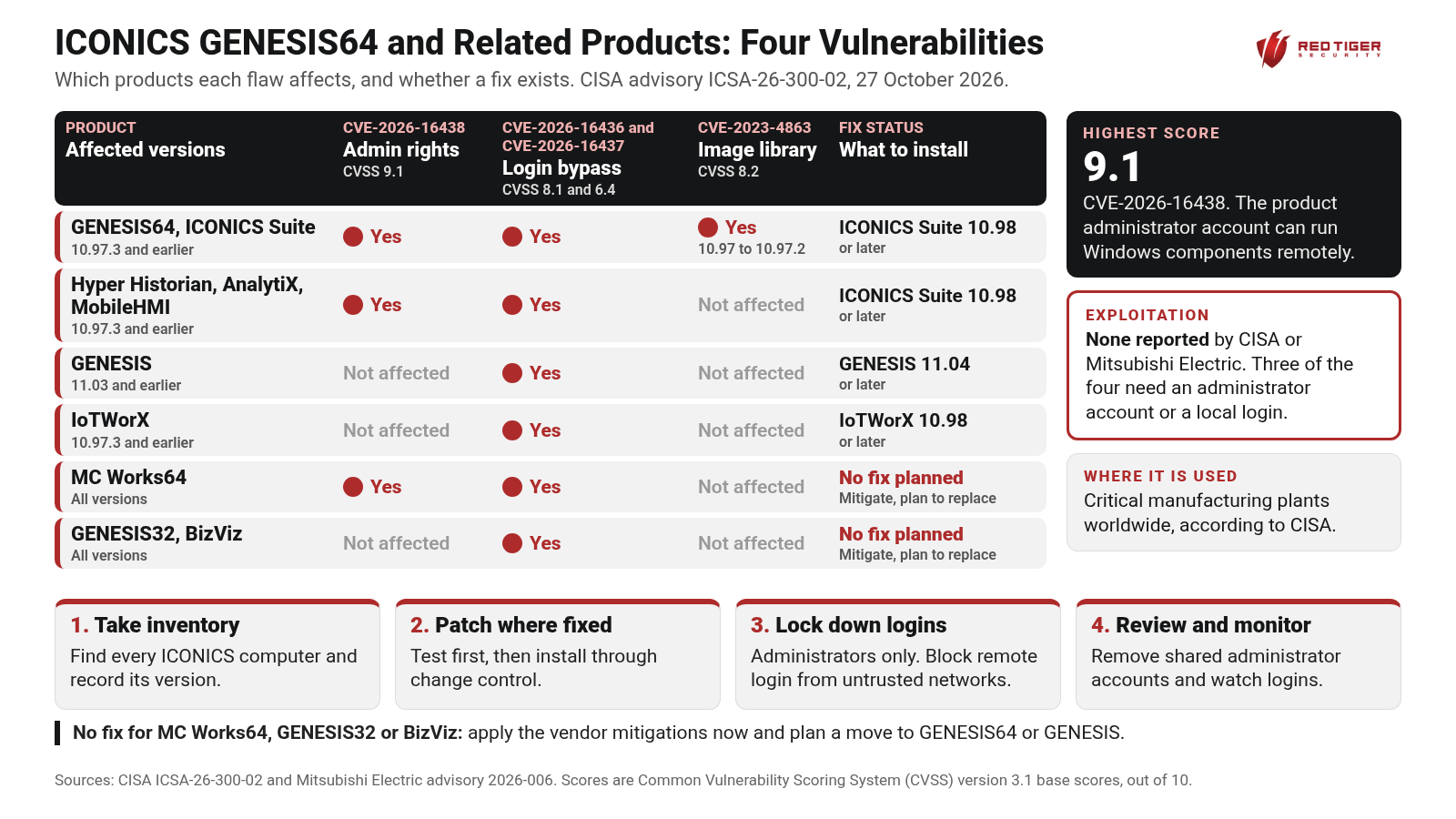
  • CVE-2026-16438, rated 9.1 (Critical) under version 3.1 and 9.4 under version 4.0: an incorrect privilege assignment, which means the software gives an account more rights than it should have. The installers grant the product administrator account default permissions for the Distributed Component Object Model (DCOM), a Windows feature that lets programs start and control software components on the same computer or across the network. Anyone who can log in with that administrator account can launch and operate those components locally or remotely without passing the User Account Control (UAC) prompt that Windows normally requires before a program gets full administrator rights. It affects GENESIS64, ICONICS Suite, Hyper Historian, AnalytiX and MobileHMI version 10.97.3 and earlier, which are fixed in ICONICS Suite 10.98 or later, and all versions of MC Works64, which will not get a fix.
  • CVE-2026-16436, rated 8.1 (High) under version 3.1 and 9.2 under version 4.0: an authentication bypass, which means a way to get past the login check without the right password. It comes from a weak password recovery mechanism. The products have a security challenge feature used to unlock the system, and the challenge response is the same fixed value for every user, so a remote attacker who obtains it by some means can unlock the system.
  • CVE-2026-16437, rated 6.4 (Medium) under version 3.1 and 7.1 under version 4.0: a second weakness in the same feature. Administrators can read and write the file that stores the challenge response, so someone logged in locally as an administrator could tamper with that file to unlock the system.
  • CVE-2023-4863, rated 8.2 (High) under version 3.1 and 9.3 under version 4.0: an out-of-bounds write in libwebp, an image library built into GENESIS64 and ICONICS Suite versions 10.97 through 10.97.2. An out-of-bounds write means the software writes data past the end of the memory set aside for it. An attacker already logged in to the computer who imports a specially crafted file as a product administrator could run their own code. It is fixed in ICONICS Suite 10.97.3 or later.

The two challenge response issues, CVE-2026-16436 and CVE-2026-16437, reach the widest set of products: GENESIS 11.03 and earlier (fixed in GENESIS 11.04 or later), GENESIS64, ICONICS Suite, Hyper Historian, AnalytiX and MobileHMI 10.97.3 and earlier (fixed in ICONICS Suite 10.98 or later), IoTWorX 10.97.3 and earlier (fixed in IoTWorX 10.98 or later), and all versions of MC Works64, GENESIS32 and BizViz. Mitsubishi Electric has no plans to fix MC Works64, GENESIS32 or BizViz, and recommends its mitigations or a move to GENESIS64 or GENESIS.

What these have in common: Mitsubishi Electric says any of the four could lead to information disclosure, tampering with or deleting information, or a denial of service, meaning the system stops working. Three of the four need an administrator account or a local login, which is why control over accounts and logins matters so much here. Neither CISA nor Mitsubishi Electric reports any exploitation of these vulnerabilities. GENESIS64, Hyper Historian, AnalytiX and MobileHMI are installed as part of ICONICS Suite, so the version to check is the ICONICS Suite version shown in the Windows list of installed apps.

Where it shows up, plant floor to cloud: GENESIS64 and GENESIS run on the operator workstations and SCADA servers in the control room, where operators watch alarms and send commands to the process. Hyper Historian runs on the historian servers that collect and store process data, which often sit in the buffer network between the control system and the business network. MobileHMI puts operator screens on phones and tablets, IoTWorX runs on IoT gateways that move plant data toward the cloud, and AnalytiX and BizViz feed the dashboards that managers and engineers use on the business side. One product family can therefore reach from the control room all the way up to enterprise and cloud systems.

What the Red Tiger team recommends:

  1. Take inventory and check versions. Find every computer running ICONICS or Mitsubishi Electric SCADA software, including historians, mobile servers, gateways and dashboards, and record the ICONICS Suite, GENESIS or IoTWorX version. Use passive, plant-safe methods on live operational technology (OT) systems.
  2. Patch to the fixed versions where they exist: ICONICS Suite 10.98 or later, GENESIS 11.04 or later and IoTWorX 10.98 or later, tested first and applied through change control. For MC Works64, GENESIS32 and BizViz, which will not get a fix, apply the vendor mitigations now and plan a move to GENESIS64 or GENESIS.
  3. Limit who can log in. Set these computers so only administrators can sign in, keep them on the plant network, block remote login from untrusted networks and hosts, and allow outside access only through a firewall and a virtual private network (VPN). Until you can patch, apply the vendor workaround for the challenge file: delete it, replace it with a blank file of the same name, and limit write and delete rights on it to a separate administrator account.
  4. Review accounts, segment and monitor. Remove shared and unused administrator accounts, keep the product administrator account out of daily use, keep SCADA servers behind firewalls and separated from the business network, and watch for unexpected logins and remote connections to these computers.

With 500+ assessments across critical infrastructure, the Red Tiger Security team helps owners find these systems with plant-safe methods, prioritize fixes against what is really installed, and lock down access from the control room to the cloud.

We are here to help, so check out our resources online at www.redtigersecurity.com and book a follow-up call with our team if you have any questions: https://calendly.com/jonathanpollet/30min

Sources: CISA advisory ICSA-26-300-02: https://www.cisa.gov/news-events/ics-advisories/icsa-26-300-02

Mitsubishi Electric advisory 2026-006: https://www.mitsubishielectric.com/psirt/vulnerability/pdf/2026-006_en.pdf

‍

Cite this advisory: Red Tiger Security, "Mitsubishi Electric ICONICS GENESIS64 and Related Products: Four Vulnerabilities, Fixes and Workarounds", October 27, 2026, https://www.redtigersecurity.com/advisory/mitsubishi-iconics-genesis64-icsa-26-300-02

Read the original source →

We are here to help.

Check out our resources and book a follow-up call with our team.